


- Results
- Services

- Resources
- Careers
- About Us
 Work with us

February 4, 2026
If your Meta-reported sales suddenly dropped natively while Shopify revenue stayed flat, this isn’t a performance issue. It’s a tracking issue.
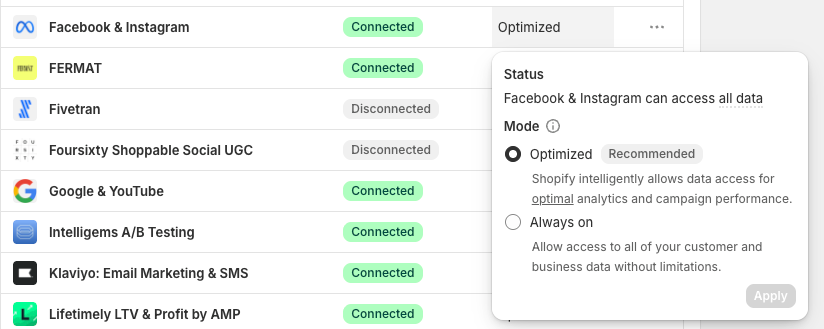
Shopify updated its default pixel data-sharing setting to “Optimized” from “Always On” which limits how much conversion data is sent back to ad channels like Meta, Google and other platforms.
The result? Fewer tracked purchases and weaker optimization signals which could result in poor performance.
How Do You Check What The Pixel Sharing Setting Is In Shopify?
Across accounts using Shopify’s native Meta pixel:
Switch your Shopify pixel data-sharing setting to “Always On.”
This shares more data back to Meta (and all other affected channels), improves optimization, and closes reporting gaps.
If Meta performance dipped overnight, check your Shopify pixel settings first.
This small toggle can have an outsized impact on your results.
Our curated, industry-leading insights will help you grow your brand.

See all


© 2025 Structured. All Rights Reserved. | Privacy Policy


